¶ Patching van een ODA
We beginnen met het opvragen van de huidige ODA-componenten en hun versie:

[root@ab031 ~]# odacli describe-component

System Version
---------------
19.16.0.0.0

System node Name
---------------
ab031

Local System Version
---------------
19.16.0.0.0

Component                                Installed Version    Available Version
---------------------------------------- -------------------- --------------------
OAK                                       19.16.0.0.0           up-to-date
GI                                        19.16.0.0.220719      up-to-date
DB {[OraDB12102_home1 [RGS12C]]           12.1.0.2.220719       up-to-date
[OraDB19000_home1 [CRGS19C]]              19.16.0.0.220719      up-to-date
}
DCSCONTROLLER                             19.16.0.0.0           up-to-date
DCSCLI                                    19.16.0.0.0           up-to-date
DCSAGENT                                  19.16.0.0.0           up-to-date
DCSADMIN                                  19.16.0.0.0           up-to-date
OS                                        7.9                   up-to-date
ILOM                                      4.0.4.22.r127518      5.1.0.20.r145377
BIOS                                      38110100              38360300
LOCAL CONTROLLER FIRMWARE {[c0]           4.650.00-7176         up-to-date
[c4]                                      800005DD              up-to-date
[c5]                                      800005DE              up-to-date
}
SHARED CONTROLLER FIRMWARE                13.00.00.00           16.00.08.00
FIRMWAREEXPANDER                          0306                  0310
LOCAL DISK FIRMWARE                       GXM10R3Q              up-to-date
SHARED DISK FIRMWARE                      A29A                  up-to-date
HMP                                       2.4.8.9.601           up-to-date

System node Name
---------------
ab032

Local System Version
---------------
19.16.0.0.0

Component                                Installed Version    Available Version
---------------------------------------- -------------------- --------------------
OAK                                       19.16.0.0.0           up-to-date
GI                                        19.16.0.0.220719      up-to-date
DB {[OraDB12102_home1 [RGS12C]]           12.1.0.2.220719       up-to-date
[OraDB19000_home1 [CRGS19C]]              19.16.0.0.220719      up-to-date
}
DCSCONTROLLER                             19.16.0.0.0           up-to-date
DCSCLI                                    19.16.0.0.0           up-to-date
DCSAGENT                                  19.16.0.0.0           up-to-date
DCSADMIN                                  19.16.0.0.0           up-to-date
OS                                        7.9                   up-to-date
ILOM                                      4.0.4.22.r126940      5.1.0.20.r145377
BIOS                                      38110100              38360300
LOCAL CONTROLLER FIRMWARE {[c0]           4.650.00-7176         up-to-date
[c4]                                      800005DD              up-to-date
[c5]                                      800005DE              up-to-date
}
SHARED CONTROLLER FIRMWARE                13.00.00.00           16.00.08.00
FIRMWAREEXPANDER                          0306                  0310
LOCAL DISK FIRMWARE                       GXM10R3Q              up-to-date
SHARED DISK FIRMWARE                      A29A                  up-to-date
HMP 2.4.8.9.601 up-to-dateMaak een snapshot van de huidige software via ODABR zie documentatie ODABR:
# /opt/odabr/odabr backup -snap

# /opt/odabr/odabr infosnap
LVM snap name         Status                COW Size              Data%
-------------         ----------            ----------            ------
root_snap             active                30.00 GiB             0.02%
opt_snap              active                30.12 GiB             0.03%
u01_snap active <40.19 GiB 0.03%Patches bestaan uit 4 gedeeltes:
¶ 1. Server Patching
Lees uit documentatie van Oracle in de patch eerst alle known errors
Controleer het zip bestand wat je in je directory op de oda hebt gezet en zet het in repository:
unzip -q -t oda-sm-19.18.0.0.0-230205-server.zip
No errors detected in compressed data of oda-sm-19.18.0.0.0-230205-server.zip.


odacli update-repository -f /tmp/oda-sm-19.18.0.0.0-230205-server.zip
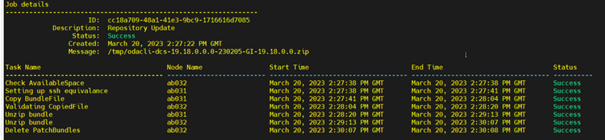
Staan in /opt/oracle/oak/pkgrepos/os/19.18 (niets meedoen!)
dcsadmin uitvoeren:
#odacli update-dcsadmin -v 19.18.0.0.0
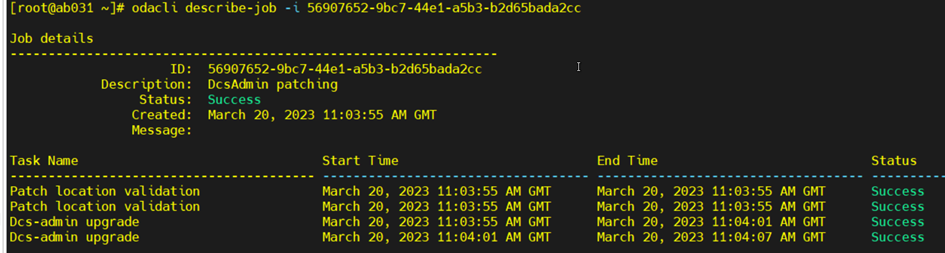
update-dcscomponents:
#odacli update-dcscomponents -v 19.18.0.0.0Hierop moeten we wachten er is geen describe job

daarna volgt de dcsagent
#odacli update-dcsagent -v 19.18.0.0.0

¶ 2. Patching van de GRID-19.18
Nu de GI patch uitpakken en in repository plaatsen
pas op dat de bestanden in directory nog passen schoon eventueel het oda-sm-19.18.0.0.0-230205-server.zip, dat heb je niet meer nodig:

#unzip -q -t p30403673_1918000_Linux-x86-64.zip
#unzip -q p30403673_1918000_Linux-x86-64.zip
#odacli update-repository -f /tmp/odacli-dcs-19.18.0.0.0-230205-GI-19.18.0.0.zipDaarna de DB patch
#unzip -q -t p30403662_1918000_Linux-x86-64.zip
 #unzip -q p3040366262_1918000_Linux-x86-64.zip

 #odacli update-repository -f /tmp/odacli-dcs-19.18.0.0.0-230205-DB-19.18.0.0.zip
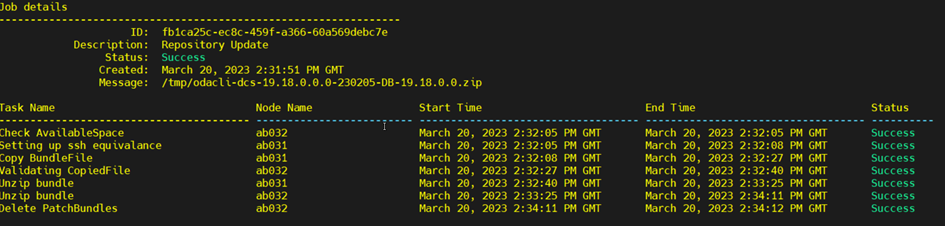
Check de snapshot:

Je ziet dat de data enorm gegroeid is.
We gaan nu een nieuwe snap maken omdat deze te groot wordt en root te vol komt:
#/opt/odabr/odabr delsnap
#/opt/odabr/odabr infosnap

#/opt/odabr/odabr backup -snap
#/opt/odabr/odabr infosnapNu gaan we de patch valideren dit gebeurd over beide nodes:
#odacli create-prepatchreport -s -v 19.18.0.0.0
#odacli describe-prepatchreport -i 29486aba-c22b-440c-b60e-035e178c74ee
#odacli describe-prepatchreport -i 29486aba-c22b-440c-b60e-035e178c74ee
Patch pre-check report
------------------------------------------------------------------------
                 Job ID:  29486aba-c22b-440c-b60e-035e178c74ee
            Description:  Patch pre-checks for [OS, ILOM, GI, ORACHKSERVER, SERVER]
                 Status:  SUCCESS
                Created:  March 20, 2023 2:48:39 PM GMT
                 Result:  All pre-checks succeeded

Node Name
---------------
ab031

Pre-Check                      Status   Comments
------------------------------ -------- --------------------------------------
__OS__
Validate supported versions     Success   Validated minimum supported versions.
Validate patching tag           Success   Validated patching tag: 19.18.0.0.0.
Is patch location available     Success   Patch location is available.
Verify OS patch                 Success   Verified OS patch
Validate command execution      Success   Validated command execution

__ILOM__
Validate ILOM server reachable  Success   Successfully connected with ILOM
                                          server using USB interconnect
Validate supported versions     Success   Validated minimum supported versions.
Validate patching tag           Success   Validated patching tag: 19.18.0.0.0.
Is patch location available     Success   Patch location is available.
Checking Ilom patch Version     Success   Successfully verified the versions
Patch location validation       Success   Successfully validated location
Validate command execution      Success   Validated command execution

__GI__
Validate GI metadata            Success   Successfully validated GI metadata
Validate supported GI versions  Success   Successfully validated minimum version
Validate available space        Success   Validated free space under /u01
Is clusterware running          Success   Clusterware is running
Validate patching tag           Success   Validated patching tag: 19.18.0.0.0.
Is system provisioned           Success   Verified system is provisioned
Validate ASM in online          Success   ASM is online
Validate kernel log level       Success   Successfully validated the OS log
                                          level
Validate minimum agent version  Success   GI patching enabled in current
                                          DCSAGENT version
Validate Central Inventory      Success   oraInventory validation passed
Validate patching locks         Success   Validated patching locks
Validate clones location exist  Success   Validated clones location
Validate DB start dependencies  Success   DBs START dependency check passed
Validate DB stop dependencies   Success   DBs STOP dependency check passed
Validate space for clones       Success   Clones volume is already created
volume
Evaluate GI patching            Success   Successfully validated GI patching
Validate command execution      Success   Validated command execution

__ORACHK__
Running orachk                  Success   Successfully ran Orachk
Validate command execution      Success   Validated command execution

__SERVER__
Validate local patching         Alert     Rolling patching is not possible: in
                                          IB enabled environments
Validate command execution      Success   Validated command execution

Node Name
---------------
ab032

Pre-Check                      Status   Comments
------------------------------ -------- --------------------------------------
__OS__
Validate supported versions     Success   Validated minimum supported versions.
Validate patching tag           Success   Validated patching tag: 19.18.0.0.0.
Is patch location available     Success   Patch location is available.
Verify OS patch                 Success   Verified OS patch
Validate command execution      Success   Validated command execution

__ILOM__
Validate ILOM server reachable  Success   Successfully connected with ILOM
                                          server using USB interconnect
Validate supported versions     Success   Validated minimum supported versions.
Validate patching tag           Success   Validated patching tag: 19.18.0.0.0.
Is patch location available     Success   Patch location is available.
Checking Ilom patch Version     Success   Successfully verified the versions
Patch location validation       Success   Successfully validated location
Validate command execution      Success   Validated command execution

__GI__
Validate GI metadata            Success   Successfully validated GI metadata
Validate supported GI versions  Success   Successfully validated minimum version
Validate available space        Success   Validated free space under /u01
Is clusterware running          Success   Clusterware is running
Validate patching tag           Success   Validated patching tag: 19.18.0.0.0.
Is system provisioned           Success   Verified system is provisioned
Validate ASM in online          Success   ASM is online
Validate kernel log level       Success   Successfully validated the OS log
                                          level
Validate minimum agent version  Success   GI patching enabled in current
                                          DCSAGENT version
Validate Central Inventory      Success   oraInventory validation passed
Validate patching locks         Success   Validated patching locks
Validate clones location exist  Success   Validated clones location
Validate DB start dependencies  Success   DBs START dependency check passed
Validate DB stop dependencies   Success   DBs STOP dependency check passed
Validate space for clones       Success   Clones volume is already created
volume
Evaluate GI patching            Success   Successfully validated GI patching
Validate command execution      Success   Validated command execution

__ORACHK__
Running orachk                  Success   Successfully ran Orachk
Validate command execution      Success   Validated command execution

__SERVER__
Validate local patching         Alert     Rolling patching is not possible: in
                                          IB enabled environments
Validate command execution Success Validated command executionDaarna gaan we echt patchen vanaf eerste node, ook dit wordt automatisch op beide nodes uitgevoerd:
#odacli update-server -v 19.18.0.0.0
#odacli describe-job -i e3d8a087-baf1-43dd-943d-d2ba32e4ac28
Job details
----------------------------------------------------------------
                     ID:  e3d8a087-baf1-43dd-943d-d2ba32e4ac28
            Description:  Server Patching
                 Status:  Success
                Created:  March 20, 2023 3:12:54 PM GMT
                Message:  Successfully patched GI with RHP

Task Name                                Node Name                 Start Time                          End Time                            Status
---------------------------------------- ------------------------- ----------------------------------- ----------------------------------- ----------
Validating GI user metadata              ab031                     March 20, 2023 3:13:25 PM GMT       March 20, 2023 3:13:25 PM GMT       Success
Validating GI user metadata              ab032                     March 20, 2023 3:13:25 PM GMT       March 20, 2023 3:13:25 PM GMT       Success
Validate ILOM server reachable           ab032                     March 20, 2023 3:13:25 PM GMT       March 20, 2023 3:14:13 PM GMT       Success
Validate ILOM server reachable           ab031                     March 20, 2023 3:13:25 PM GMT       March 20, 2023 3:14:18 PM GMT       Success
Validate DCS Admin mTLS setup            ab032                     March 20, 2023 3:14:18 PM GMT       March 20, 2023 3:14:18 PM GMT       Success
Validate DCS Admin mTLS setup            ab031                     March 20, 2023 3:14:18 PM GMT       March 20, 2023 3:14:18 PM GMT       Success
Configure export clones resource         ab031                     March 20, 2023 3:14:20 PM GMT       March 20, 2023 3:14:21 PM GMT       Success
Creating repositories using yum          ab032                     March 20, 2023 3:14:25 PM GMT       March 20, 2023 3:14:29 PM GMT       Success
Updating YumPluginVersionLock rpm        ab032                     March 20, 2023 3:14:30 PM GMT       March 20, 2023 3:14:30 PM GMT       Success
Applying OS Patches                      ab032                     March 20, 2023 3:14:30 PM GMT       March 20, 2023 3:26:26 PM GMT       Success
Creating repositories using yum          ab032                     March 20, 2023 3:26:38 PM GMT       March 20, 2023 3:26:38 PM GMT       Success
Applying HMP Patches                     ab032                     March 20, 2023 3:26:39 PM GMT       March 20, 2023 3:27:02 PM GMT       Success
Patch location validation                ab032                     March 20, 2023 3:27:03 PM GMT       March 20, 2023 3:27:03 PM GMT       Success
Patch location validation                ab031                     March 20, 2023 3:27:03 PM GMT       March 20, 2023 3:27:03 PM GMT       Success
Oda-hw-mgmt upgrade                      ab031                     March 20, 2023 3:27:03 PM GMT       March 20, 2023 3:27:41 PM GMT       Success
Oda-hw-mgmt upgrade                      ab032                     March 20, 2023 3:27:41 PM GMT       March 20, 2023 3:28:18 PM GMT       Success
OSS Patching                             ab032                     March 20, 2023 3:28:18 PM GMT       March 20, 2023 3:28:18 PM GMT       Success
Applying Firmware Disk Patches           ab032                     March 20, 2023 3:28:25 PM GMT       March 20, 2023 3:28:32 PM GMT       Success
Applying Firmware Controller Patches     ab032                     March 20, 2023 3:28:39 PM GMT       March 20, 2023 3:28:48 PM GMT       Success
Checking Ilom patch Version              ab031                     March 20, 2023 3:28:49 PM GMT       March 20, 2023 3:28:51 PM GMT       Success
Checking Ilom patch Version              ab032                     March 20, 2023 3:28:51 PM GMT       March 20, 2023 3:28:54 PM GMT       Success
Patch location validation                ab031                     March 20, 2023 3:28:54 PM GMT       March 20, 2023 3:28:55 PM GMT       Success
Patch location validation                ab032                     March 20, 2023 3:28:54 PM GMT       March 20, 2023 3:28:55 PM GMT       Success
Save password in Wallet                  ab032                     March 20, 2023 3:28:56 PM GMT       March 20, 2023 3:28:58 PM GMT       Success
Disabling IPMI v2                        ab032                     March 20, 2023 3:29:02 PM GMT       March 20, 2023 3:29:06 PM GMT       Success
Apply Ilom patch                         ab031                     March 20, 2023 3:29:06 PM GMT       March 20, 2023 3:32:55 PM GMT       Success
Apply Ilom patch                         ab032                     March 20, 2023 3:32:55 PM GMT       March 20, 2023 3:36:42 PM GMT       Success
Copying Flash Bios to Temp location      ab031                     March 20, 2023 3:36:42 PM GMT       March 20, 2023 3:36:42 PM GMT       Success
Copying Flash Bios to Temp location      ab032                     March 20, 2023 3:36:42 PM GMT       March 20, 2023 3:36:42 PM GMT       Success
Starting the clusterware                 ab032                     March 20, 2023 3:38:33 PM GMT       March 20, 2023 3:40:03 PM GMT       Success
Registering image                        ab032                     March 20, 2023 3:40:03 PM GMT       March 20, 2023 3:40:03 PM GMT       Success
Registering working copy                 ab031                     March 20, 2023 3:40:03 PM GMT       March 20, 2023 3:40:04 PM GMT       Success
Registering image                        ab032                     March 20, 2023 3:40:04 PM GMT       March 20, 2023 3:40:04 PM GMT       Success
Creating GI home directories             ab032                     March 20, 2023 3:40:04 PM GMT       March 20, 2023 3:40:04 PM GMT       Success
Extract GI clone                         ab031                     March 20, 2023 3:40:04 PM GMT       March 20, 2023 3:40:04 PM GMT       Success
Extract GI clone                         ab032                     March 20, 2023 3:40:04 PM GMT       March 20, 2023 3:40:04 PM GMT       Success
Provisioning Software Only GI with RHP   ab031                     March 20, 2023 3:40:04 PM GMT       March 20, 2023 3:40:04 PM GMT       Success
Relink GI                                ab032                     March 20, 2023 3:40:04 PM GMT       March 20, 2023 3:40:04 PM GMT       Success
Patch GI with RHP                        ab031                     March 20, 2023 3:40:04 PM GMT       March 20, 2023 3:55:32 PM GMT       Success
Updating GIHome version                  ab031                     March 20, 2023 3:55:32 PM GMT       March 20, 2023 3:55:37 PM GMT       Success
Updating GIHome version                  ab032                     March 20, 2023 3:55:32 PM GMT       March 20, 2023 3:55:37 PM GMT       Success
Validate GI availability                 ab031                     March 20, 2023 3:55:46 PM GMT       March 20, 2023 3:55:46 PM GMT       Success
Patch KVM CRS type                       ab031                     March 20, 2023 3:55:46 PM GMT       March 20, 2023 3:55:47 PM GMT       Success
Patch VM vDisks CRS dependencies         ab031                     March 20, 2023 3:55:47 PM GMT       March 20, 2023 3:55:47 PM GMT       Success
Patch DB System domain config            ab031                     March 20, 2023 3:55:47 PM GMT       March 20, 2023 3:55:47 PM GMT       Success
Update System version                    ab031                     March 20, 2023 3:55:47 PM GMT       March 20, 2023 3:55:47 PM GMT       Success
Update System version                    ab032                     March 20, 2023 3:55:47 PM GMT       March 20, 2023 3:55:47 PM GMT       Success
Cleanup JRE Home                         ab031                     March 20, 2023 3:55:47 PM GMT       March 20, 2023 3:55:47 PM GMT       Success
Add SYSNAME in Env                       ab032                     March 20, 2023 3:55:48 PM GMT       March 20, 2023 3:55:48 PM GMT       Success
Starting the clusterware                 ab032                     March 20, 2023 3:55:48 PM GMT       March 20, 2023 3:55:48 PM GMT       Success
Setting ACL for disk groups              ab031                     March 20, 2023 3:55:48 PM GMT       March 20, 2023 3:55:55 PM GMT       Success
Enable LKCE                              ab032                     March 20, 2023 3:57:56 PM GMT       March 20, 2023 4:01:03 PM GMT       Success
Enable LKCE                              ab031                     March 20, 2023 3:57:56 PM GMT       March 20, 2023 4:01:56 PM GMT       Success
Update previous workarounds              ab031                     March 20, 2023 4:01:57 PM GMT       March 20, 2023 4:01:57 PM GMT       Success
Update previous workarounds              ab032                     March 20, 2023 4:01:57 PM GMT       March 20, 2023 4:01:57 PM GMT       Success
Generating and saving BOM                ab032                     March 20, 2023 4:01:57 PM GMT       March 20, 2023 4:02:52 PM GMT       Success
Generating and saving BOM                ab031                     March 20, 2023 4:01:57 PM GMT       March 20, 2023 4:02:53 PM GMT       Success
PreRebootNode Actions                    ab031                     March 20, 2023 4:02:53 PM GMT       March 20, 2023 4:03:49 PM GMT       Success
PreRebootNode Actions                    ab032                     March 20, 2023 4:03:49 PM GMT       March 20, 2023 4:04:45 PM GMT       Success
Reboot Ilom                              ab031                     March 20, 2023 4:04:45 PM GMT       March 20, 2023 4:04:45 PM GMT       Success
Reboot Ilom ab032 March 20, 2023 4:04:45 PM GMT March 20, 2023 4:04:45 PM GMT SuccessWacht tot servers gereboot zijn (dit kan even duren)
We kijken nu wat er met de components is gebeurd:
[root@ab032 ~]# odacli describe-component
System Version
---------------
19.18.0.0.0

System node Name
---------------
ab031

Local System Version
---------------
19.18.0.0.0

Component                                Installed Version    Available Version
---------------------------------------- -------------------- --------------------
OAK
                                          19.18.0.0.0           up-to-date
GI
                                          19.18.0.0.230117      up-to-date
DB {
[OraDB12102_home1 [RGS12C]]
                                          12.1.0.2.220719       not-available
[OraDB19000_home1 [CRGS19C]]
                                          19.16.0.0.220719      19.18.0.0.230117
}
DCSCONTROLLER
                                          19.18.0.0.0           up-to-date
DCSCLI
                                          19.18.0.0.0           up-to-date
DCSAGENT
                                          19.18.0.0.0           up-to-date
DCSADMIN
                                          19.18.0.0.0           up-to-date
OS
                                          7.9                   up-to-date
ILOM
                                          4.0.4.22.r127518      5.1.0.23.r146986
BIOS
                                          38110100              38370100
LOCAL CONTROLLER FIRMWARE {
[c0]
                                          4.650.00-7176         up-to-date
[c4]
                                          800005DD              up-to-date
[c5]
                                          800005DE              up-to-date
}
SHARED CONTROLLER FIRMWARE
                                          13.00.00.00           16.00.08.00
FIRMWAREEXPANDER
                                          0306                  0310
LOCAL DISK FIRMWARE
                                          GXM10R3Q              up-to-date
SHARED DISK FIRMWARE
                                          A29A                  up-to-date
HMP
                                          2.4.8.9.604           up-to-date
System node Name
---------------
ab032

Local System Version
---------------
19.18.0.0.0

Component                                Installed Version    Available Version
---------------------------------------- -------------------- --------------------
OAK
                                          19.18.0.0.0           up-to-date
GI
                                          19.18.0.0.230117      up-to-date
DB {
[OraDB12102_home1 [RGS12C]]
                                          12.1.0.2.220719       not-available
[OraDB19000_home1 [CRGS19C]]
                                          19.16.0.0.220719      19.18.0.0.230117
}
DCSCONTROLLER
                                          19.18.0.0.0           up-to-date
DCSCLI
                                          19.18.0.0.0           up-to-date
DCSAGENT
                                          19.18.0.0.0           up-to-date
DCSADMIN
                                          19.18.0.0.0           up-to-date
OS
                                          7.9                   up-to-date
ILOM
                                          4.0.4.22.r126940      5.1.0.23.r146986
BIOS
                                          38110100              38370100
LOCAL CONTROLLER FIRMWARE {
[c0]
                                          4.650.00-7176         up-to-date
[c4]
                                          800005DD              up-to-date
[c5]
                                          800005DE              up-to-date
}
SHARED CONTROLLER FIRMWARE
                                          13.00.00.00           16.00.08.00
FIRMWAREEXPANDER
                                          0306                  0310
LOCAL DISK FIRMWARE
                                          GXM10R3Q              up-to-date
SHARED DISK FIRMWARE
                                          A29A                  up-to-date
HMP
2.4.8.9.604 up-to-date¶ 3. Storage Patching
De eerste stap in het patchen van de storage is het aanmaken van een 'prepatch report'
[root@ab031 ~]# odacli create-prepatchreport -st -v 19.18.0.0.0

Job details
----------------------------------------------------------------
                     ID:  c83bd185-3ad8-4195-9f68-8be3713ecfd8
            Description:  Patch pre-checks for [STORAGE]
                 Status:  Created
                Created:  March 28, 2023 7:32:36 AM GMT
                Message:  Use 'odacli describe-prepatchreport -i 61acedc6-f179-4654-974a-2ef648376926' to check details of results

Task Name                                Start Time                          End Time                            Status
---------------------------------------- ----------------------------------- ----------------------------------- ----------

[root@ab031 ~]#In de Message staat het commando hoe de resultaten van deze precheck te achterhalen zijn.
[root@ab031 ~]# odacli describe-prepatchreport -i 61acedc6-f179-4654-974a-2ef648376926

Patch pre-check report
------------------------------------------------------------------------
                 Job ID:  61acedc6-f179-4654-974a-2ef648376926
            Description:  Patch pre-checks for [STORAGE]
                 Status:  SUCCESS
                Created:  March 28, 2023 7:35:24 AM GMT
                 Result:  All pre-checks succeeded

Node Name
---------------
ab031

Pre-Check                      Status   Comments
------------------------------ -------- --------------------------------------
__STORAGE__
Validate patching tag           Success   Validated patching tag: 19.18.0.0.0.
Patch location validation       Success   Verified patch location
Patch tag validation            Success   Verified patch tag
Storage patch tag validation    Success   Verified storage patch location
Verify ASM disks status         Success   ASM disks are online
Validate rolling patch          Alert     Rolling mode patching not allowed as
                                          there is expander and controller
                                          upgrade.
Validate command execution      Success   Validated command execution

Node Name
---------------
ab032

Pre-Check                      Status   Comments
------------------------------ -------- --------------------------------------
__STORAGE__
Validate patching tag           Success   Validated patching tag: 19.18.0.0.0.
Patch location validation       Success   Verified patch location
Patch tag validation            Success   Verified patch tag
Storage patch tag validation    Success   Verified storage patch location
Verify ASM disks status         Success   ASM disks are online
Validate rolling patch          Alert     Rolling mode patching not allowed as
                                          there is expander and controller
                                          upgrade.
Validate command execution      Success   Validated command execution


[root@ab031 ~]#De Alert geeft aan dat een Rolling mode patching niet mogelijk is. Het starten van de storage firmware patch gebeurt met odacli update-storage, waarbij het versienummer van de patch wordt meegegeven.
[root@ab031 ~]# odacli update-storage -v 19.18.0.0.0De voortgang van deze job controleer je op de gebruikelijke manier.
[root@ab031 ~]# odacli describe-job -i f2df0fd1-7304-4090-ad7e-6d3a3773e224

Job details
----------------------------------------------------------------
                     ID:  f2df0fd1-7304-4090-ad7e-6d3a3773e224
            Description:  Storage Firmware Patching
                 Status:  Success
                Created:  March 28, 2023 7:38:39 AM GMT
                Message:

Task Name                                Node Name                 Start Time                          End Time                            Status
---------------------------------------- ------------------------- ----------------------------------- ----------------------------------- ----------
Applying Firmware Disk Patches           ab032                     March 28, 2023 7:38:56 AM GMT       March 28, 2023 7:39:05 AM GMT       Success
Applying Firmware Expander Patches       ab032                     March 28, 2023 7:42:48 AM GMT       March 28, 2023 7:42:59 AM GMT       Success
Applying Firmware Controller Patches     ab032                     March 28, 2023 7:48:57 AM GMT       March 28, 2023 7:54:52 AM GMT       Success
Generating and saving BOM                ab031                     March 28, 2023 7:54:52 AM GMT       March 28, 2023 7:55:03 AM GMT       Success
Generating and saving BOM                ab032                     March 28, 2023 7:54:52 AM GMT       March 28, 2023 7:54:59 AM GMT       Success
PreRebootNode Actions                    ab031                     March 28, 2023 7:55:03 AM GMT       March 28, 2023 7:55:03 AM GMT       Success
PreRebootNode Actions                    ab032                     March 28, 2023 7:55:03 AM GMT       March 28, 2023 7:55:03 AM GMT       Success
Reboot Ilom                              ab031                     March 28, 2023 7:55:03 AM GMT       March 28, 2023 7:55:03 AM GMT       Success
Reboot Ilom                              ab032                     March 28, 2023 7:55:03 AM GMT       March 28, 2023 7:55:03 AM GMT       Success

[root@ab031 ~]#Je ziet dat de firmware ge-patcht is.
¶ 4. DB-patching
<< is nog niet uitgewerkt >>
¶ 5. Handmatig patchen ILOM en BIOS
Als na het patchen in de output van het odacli describe-componentcommando de versie van de ILOM en/of BIOS niet de status up-to-date heeft, moet dit handmatig op beide database nodes gepatcht worden.
Component                                Installed Version    Available Version
---------------------------------------- -------------------- --------------------
ILOM
                                          4.0.4.22.r127518      5.1.0.23.r146986
BIOS
38110100 38370100De eerste stap is de patch ILOM-5_1_0_23_r146986-ORACLE_SERVER_X6-2-rom.pkgoverhalen naar een locale disk. De patch is te vinden in de pkgrepos directory op de ODA: /opt/oracle/oak/pkgrepos/ilom/x6-2/5.1.0.23.r146986
[root@ab031 5.1.0.23.r146986]# pwd
/opt/oracle/oak/pkgrepos/ilom/x6-2/5.1.0.23.r146986
[root@ab031 5.1.0.23.r146986]# ls -ltr
total 30156
-rwxrwx--- 1 root root 30859662 Feb  5 15:36 ILOM-5_1_0_23_r146986-ORACLE_SERVER_X6-2-rom.pkg
-r-xr-x--- 1 root root     8694 Feb  5 15:36 flash_bios_x62.pkg
-rwxrwx--- 1 root root      866 Feb  5 15:36 componentmetadata.xml
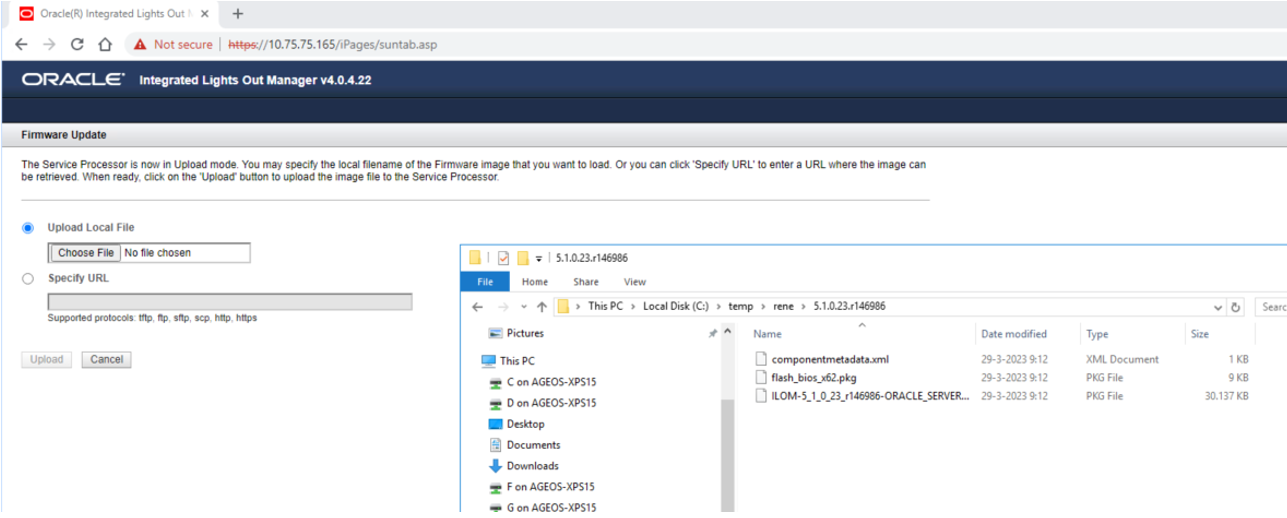
[root@ab031 5.1.0.23.r146986]#Vervolgens ga je in de ILOM naar ‘ILOM Administration’ menu ‘Maintanance’ en kies daar voor ‘Enter Update Mode’

Het volgende scherm verschijnt. De radio button ‘Upload Local File’ staat standaard aan en kies hier voor ‘Choose File’.
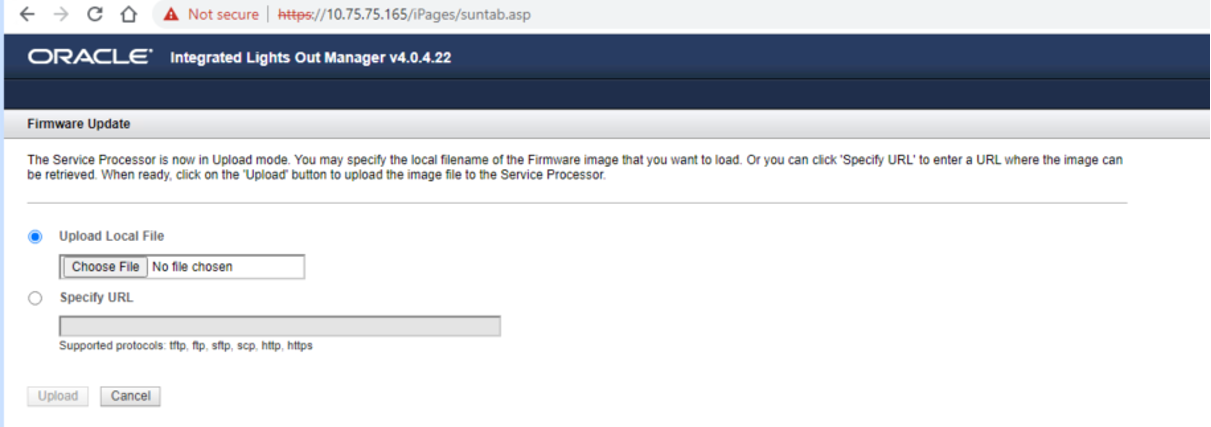
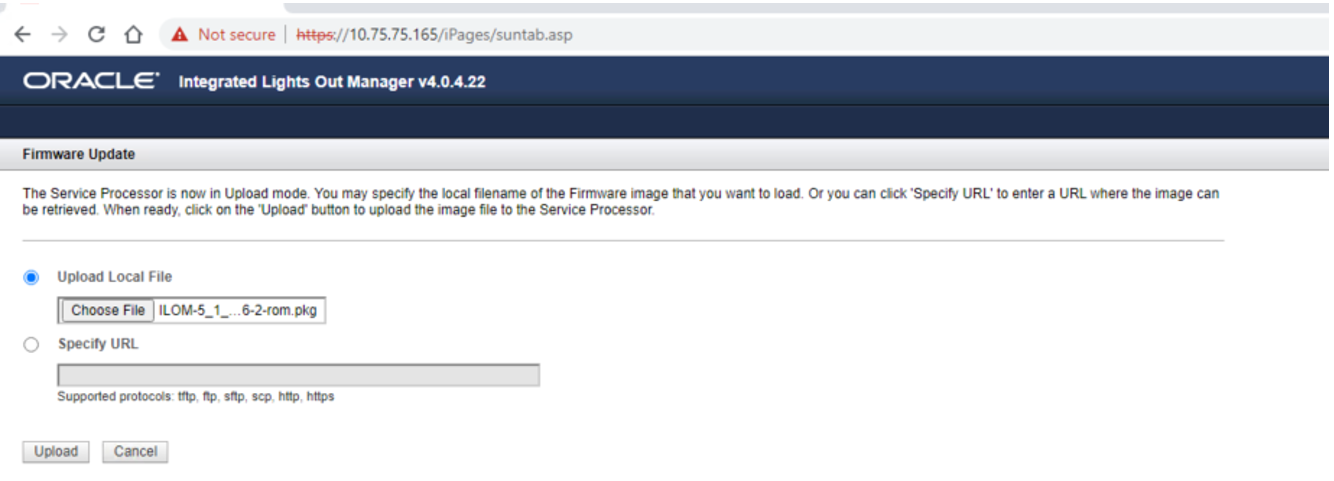
Hier kies je ILOM-5_1_0_23_r146986-ORACLE_SERVER_X6-2-rom.pkg, de dile die je overgehaald hebt naar je locale schijf.
Kies ‘Upload’
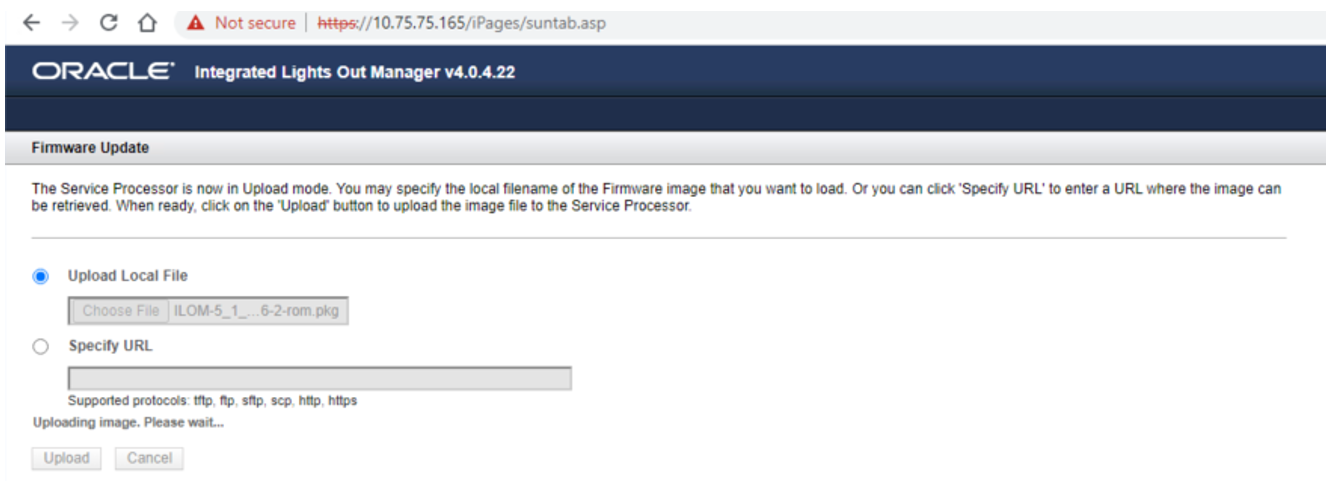
De melding ‘Uploading image, please wait….' verschijnt en dit duurt een tijdje.
Na het uploaden wordt een ‘verify’ uitgevoerd.
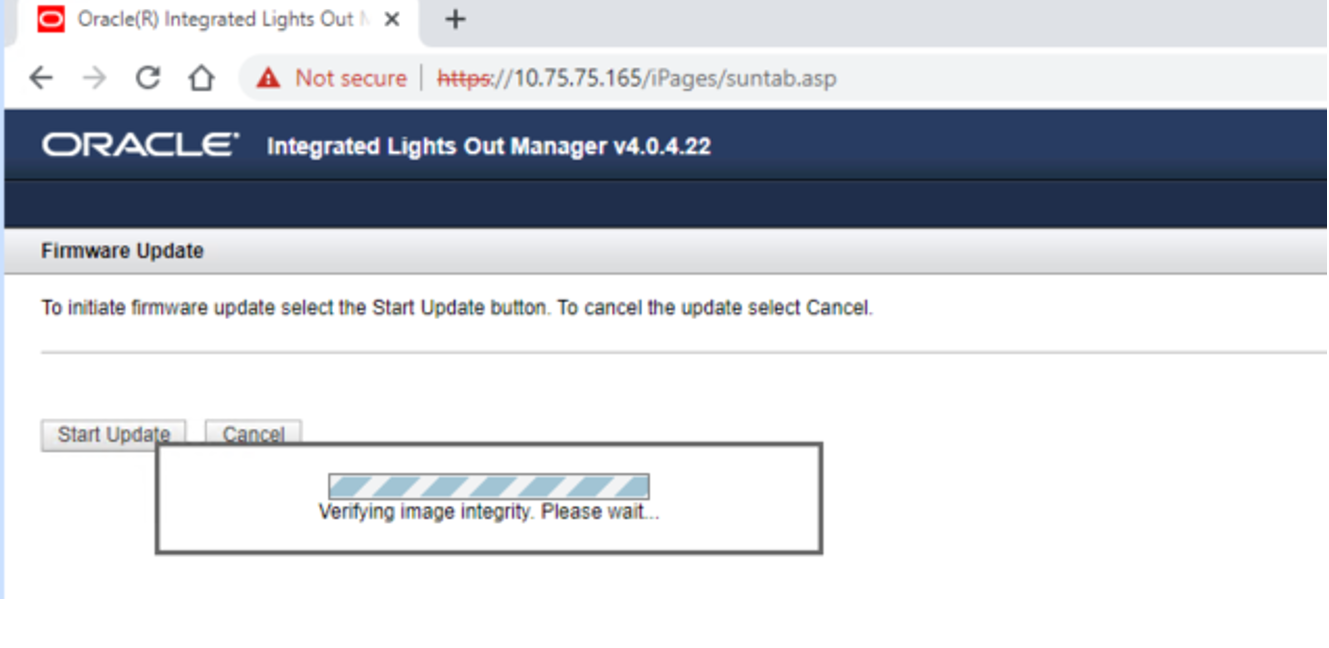
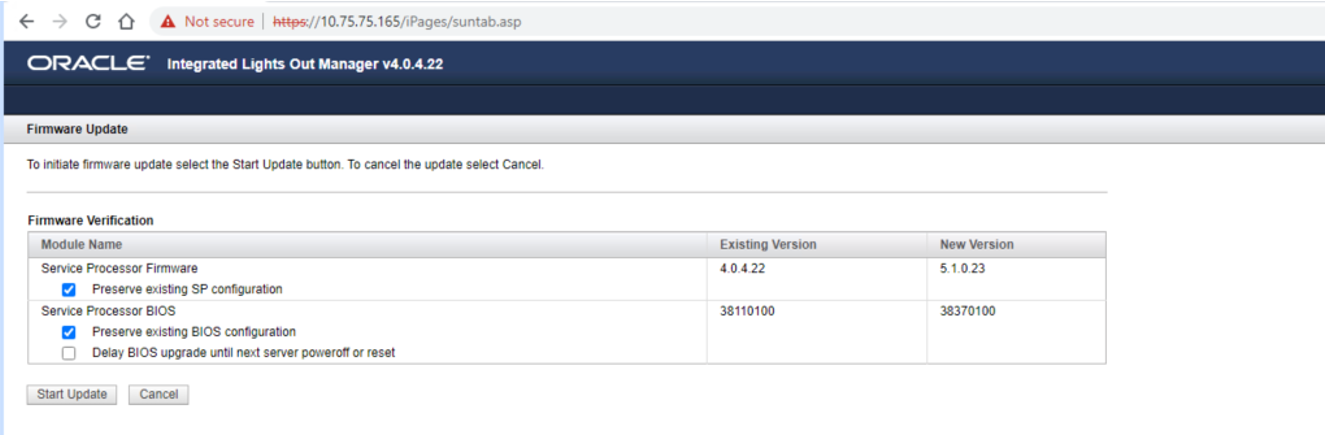
Hierna verschin thet volgende scherm met 2 vinkjes aangevingd, dit is nodig. Kies ‘Start Update’ om de update te starten.
Er verschijnt een 'voortgang' scherm.
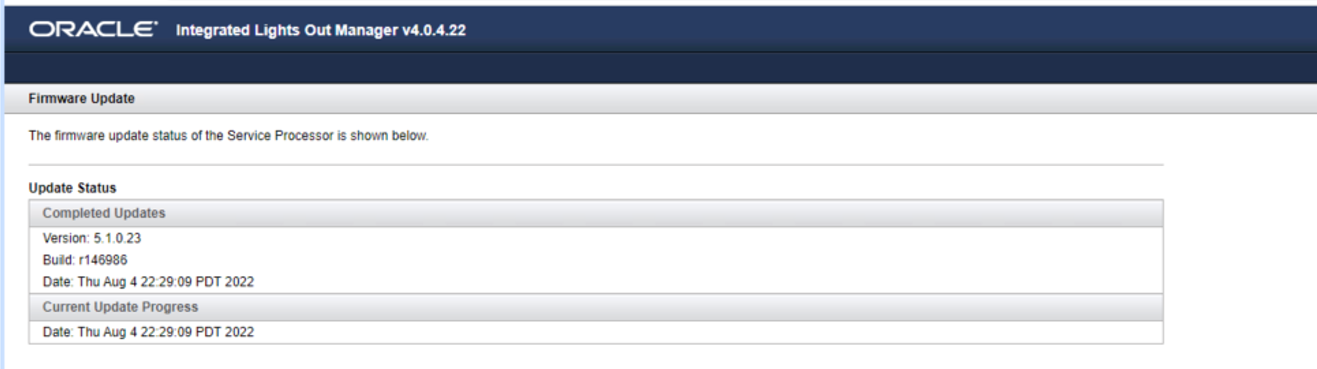
Dit wordt ‘aangevuld’ totdat de ILOM en BIOS patch geïnstalleerd is.
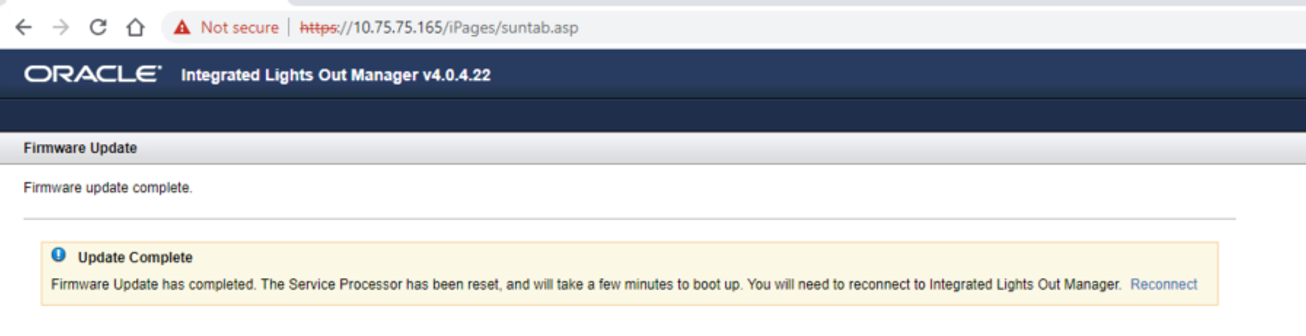
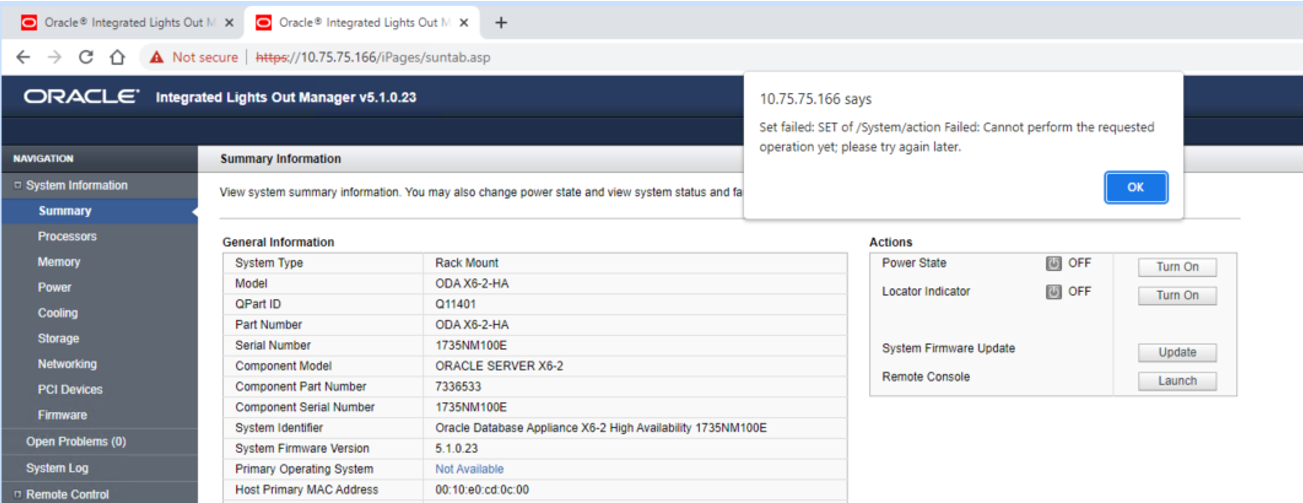
In de ILOM wordt aangegeven dat de machine ge-reboot wordt. Na het rebooten van de ILOM staat de database node uit en moet deze via de ILOM aangezet worden. Je ziet dan ook dat de versie van de ILOM veranderd is t.o.v. de vorige screenshots.
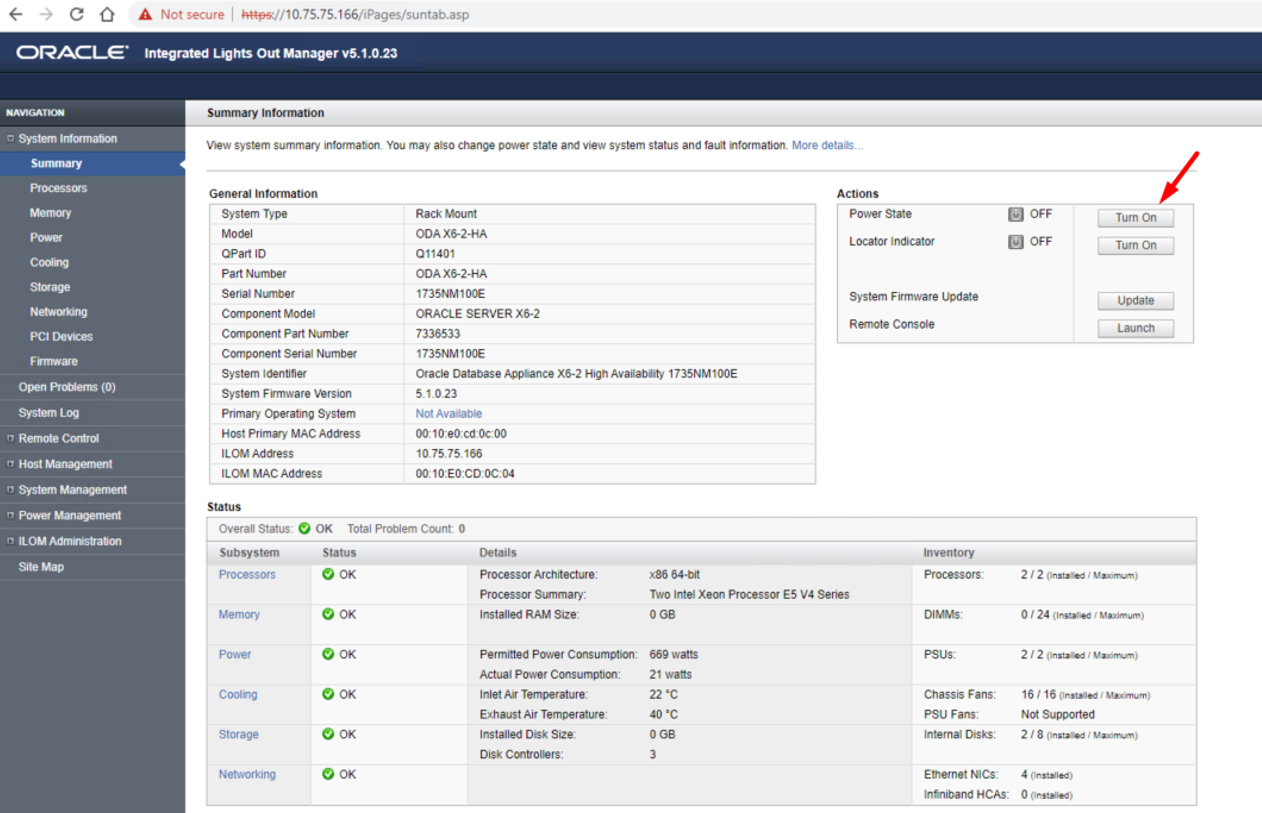
Als geprobeerd wordt om de database server te vroeg aan te zetten, komt de ILOM met een melding
Na het patchen moeten de eerder gemaakte snapshots verwijderd worden, deze zijn niet meer bruikbaar.
